Microsoft recently updated the session controls for Conditional Access in Entra ID to support reauthentication for a greater range of resources. Read the full announcement on Microsoft Tech Community. This includes some key resources that are vulnerable to session hijacking, helping to combat one of the fastest growing forms of account compromise, which can seemingly bypass MFA!
Session Hijacking Risks
The increase in session hijacking attacks (see this article on Google account compromise) has demonstrated that persistent browser cookies are vulnerable to theft via malware, and session tokens can be obtained via increasingly common and easy to use adversary-in-the-middle (AITM) phishing attacks. These artifacts enable the attacker to replay or hijack the user’s session. If the user has already authenticated with multi-factor when the session is stolen, the successful MFA claim can be included in the token, allowing an attacker to effectively bypass MFA while the session is active. Attackers will then attempt to establish persistence through privilege escalation, password change, or by registering new authentication methods on the account.
While security teams have been well aware of this threat for a long time, Microsoft themselves still don’t offer much official guidance and seem to downplay the potential for attacks, having been slower to introduce effective controls than many would like. In my opinion, Microsoft could do better at conveying the risks associated with this attack vector. Statements like “MFA reduces the risk of account breach by 99.9%” are great for marketing or getting executive buy-in for cybersecurity initiatives, but it can also lead to complacency in organisations that fail to recognise the rapidly evolving threat landscape. And with most businesses now operating at least partially in the cloud and being reliant on identity providers such as Microsoft, Google, or Okta, the exposure to this risk is underestimated if there is a perception that MFA is a silver bullet against account compromise.
Protect Against Session Hijacking
Unfortunately, there is no one-size-fits-all solution for preventing this sort of attack. While I can’t go over every method to secure your Microsoft cloud environment from session hijacking in one post, I will highlight how useful requiring reauthentication is for some resources that are particularly vulnerable to this threat. Be mindful that frequent login prompts will interrupt workflows, so take caution before deploying these controls in your environment.
Authentication Contexts
One of the most practical ways to enforce authentication for every sign-in is to use authentication contexts:
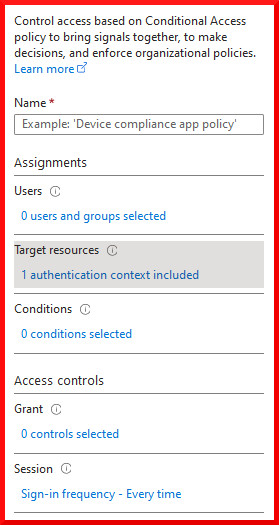
If you haven’t used authentication contexts before, they are a great way to apply a consistent set of security controls across Entra ID resources and applications. They are a bit like sensitivity labels, except the effects are all defined in the conditional access policy assigned to the authentication context. The auth context acts as a label that can be assigned on certain resources, which receive any effects applied to the label in conditional access. In this way you can apply controls on a broad range of disparate resources, which in some cases are not otherwise able to be targeted in Conditional Access policies.
Consider applying auth contexts with this control to highly privileged resources, highly sensitive external applications that connect with the Microsoft identity platform, or to highly restricted Sharepoint sites. Avoid applying auth contexts with this control to the most frequently used resources in your environment.
Privileged Identity Management
Microsoft Privileged Identity Management is a P2 feature in Entra ID that allows users to temporarily activate Entra roles on their account. While this is a great option to ensure admin accounts are operating with least privilege, you may have noticed that despite having an option to require MFA upon elevation, this effect is only enforced if the user has not already completed an MFA challenge. This means that the MFA challenge does not necessarily occur at the time of elevation, assuming that all user accounts have MFA enforced to begin with.
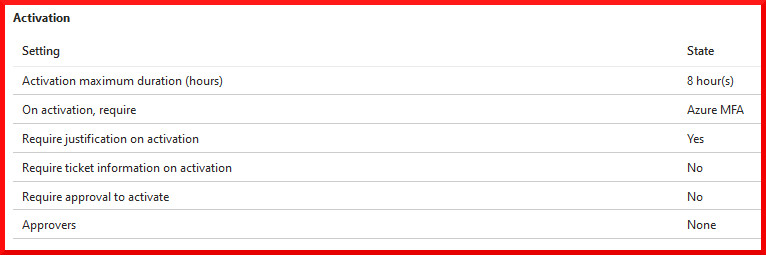
If a user with Entra roles is compromised, it’s likely they already completed an MFA challenge during their initial login. An attacker with a stolen session could elevate to an available role and would not be prompted to perform MFA, since they hold a valid MFA claim in the token.
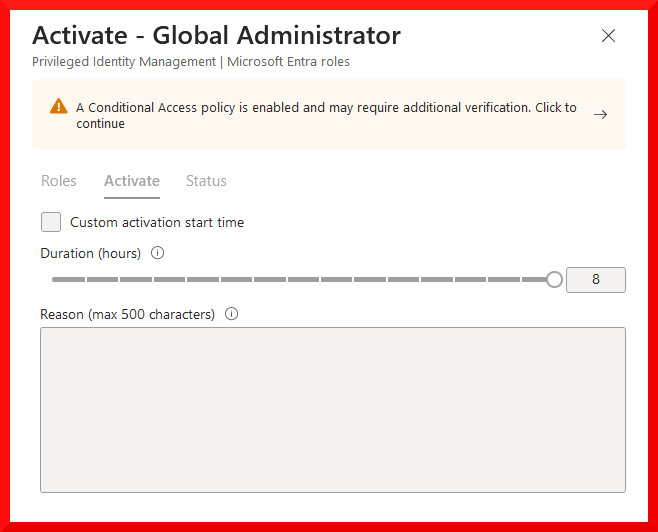
Luckily we can now apply an authentication context requirement in the Entra Role Settings, to ensure that authentication and an MFA challenge occurs every time the role is activated, making it more difficult to use a stolen session for this activity:
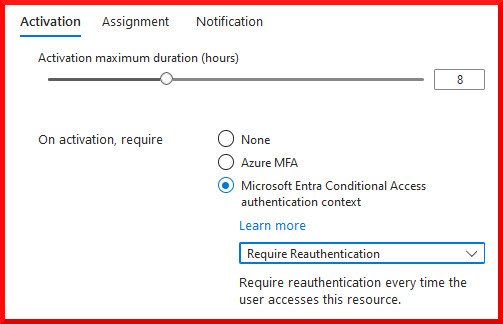
Apply an auth context to ensure reauthentication and a new MFA challenge every time the role is activated!
Security Info Registration
A common tactic during account compromise is for the attacker to register new authentication methods on the user’s account for persistent access. Ensuring that users (and any attackers) must reauthenticate every time they attempt to add a new authentication method is a great way to start protecting the Security Info Registration page:
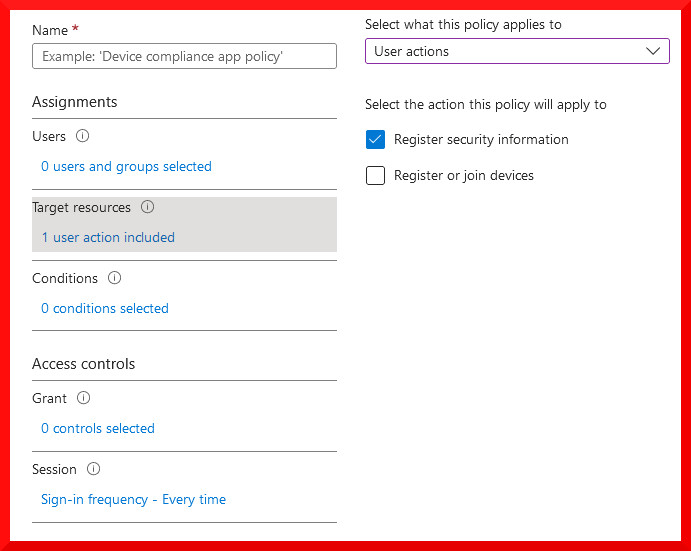
You can find Security Info Registration under the user actions target resource type. If you already have another Conditional Access policy enforcing MFA for all users, this will be triggered by the sign-in frequency control, allowing you to separate your policies if necessary.
User Experience
Previously, the scope of the available resources was limited when enforcing reauthentication every time a user signs in. The sign-in frequency session control could only be set to every time when configuring a policy for risky sign-in detection, or when targeting the Intune device enrollment resource.
Prompting for authentication every time a resource is accessed can be counter productive when it disrupts workflows and creates sign-in fatigue. Which is why access tokens and cookies exist in the first place. Microsoft does in fact provide a warning message when the sign-in frequency is set to every time for an authentication context. Like most controls in Conditional Access, taking a heavy-handed approach and applying it indiscriminately will lead to a very poor user experience, to say the least!
Conclusion
In summary, reauthentication session controls can now be applied to most resources and user actions in Entra ID conditional access, providing another layer of security against session hijacking attacks. Organisations should work closely with IT and security teams to identify critical resources to be protected by enhanced session controls and develop a framework for their deployment. Organisations should also be careful not to rely solely on multifactor authentication with the expectation that account compromise can no longer occur once it has been implemented. A multilayered, defense-in-depth approach that adheres to Zero Trust principles is essential.
 IdentityPoint